← Back to Blog

Let's Code: Assembly Organization Using Services

Eric Padua·
Hello friends, and welcome to another blog series! This time, we're going to showcase some design patterns that really leverage the coding capabilities within OneStream.
Now, this isn't meant to be a series of me droning on about how code works in OneStream, or why it works, or what the equivalent computer science lingo is for certain things (I actually started the blog out this way and I said to myself after writing a bunch, "There is no way anyone is going to read this if even I don't want to re-read this in the moment as I review.")
So, I've decided that this is going to be purely a series where I show you how things get kicked off in OneStream based on what the desired actions or outputs need to be when using coding constructs. We'll focus on the "how-to" and the "why-we-use-it," not the dense theory.
The cadence for the series will be random lumped in with any other series types I come up with. It really just depends on what I want to write for the week!

Assembly Finance Custom Calc

Alright, let's set the stage. I want to kick off a finance calculation that is workflow dependent.
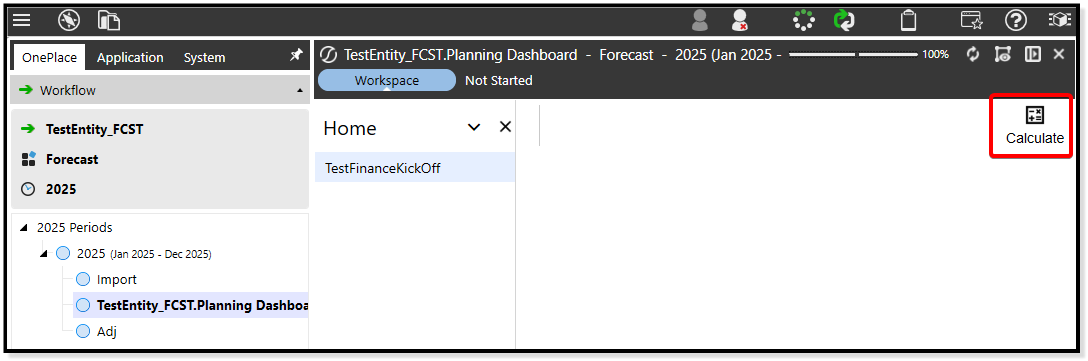
Workflow dependent finance calc
Made with Genesis in 2 minutes btw
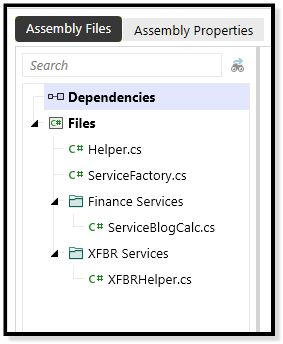
To do this, I have a finance custom calc service in my assembly that has the specific calculation I want to happen for the entity:
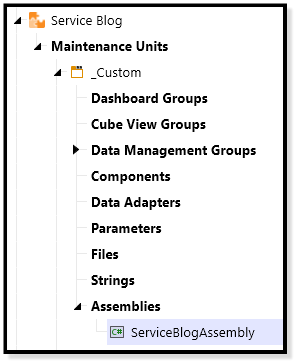
The Assembly
The Assembly
The Files
The Files
I also have some code in helper classes (an extender and an XFBR) that get me workflow variables as well as the entity name from the workflow, anticipating that I'll have to get these all the time (reusability, folks!):
c#Helper
1
2using System;
3using System.Collections.Generic;
4using System.Data;
5using System.Data.Common;
6using System.Globalization;
7using System.IO;
8using System.Linq;
9using Microsoft.CSharp;
10using OneStream.Finance.Database;
11using OneStream.Finance.Engine;
12using OneStream.Shared.Common;
13using OneStream.Shared.Database;
14using OneStream.Shared.Engine;
15using OneStream.Shared.Wcf;
16using OneStream.Stage.Database;
17using OneStream.Stage.Engine;
18using OneStreamWorkspacesApi;
19using OneStreamWorkspacesApi.V800;
20
21namespace Workspace.__WsNamespacePrefix.__WsAssemblyName
22{
23  public class Helper
24  {
25      public (string wfName, string wfScenario, string wfTime) GetWFVariables(SessionInfo si)
26      {
27          try
28          {
29              string wfName = BRApi.Workflow.Metadata.GetProfile(si, si.WorkflowClusterPk.ProfileKey).Name;
30              string wfScenario = BRApi.Finance.Members.GetMemberName(si, (int)DimTypeId.Scenario, si.WorkflowClusterPk.ScenarioKey);
31              string wfTime = BRApi.Finance.Members.GetMemberName(si, (int)DimTypeId.Time, si.WorkflowClusterPk.TimeKey);
32
33              return (wfName, wfScenario, wfTime);
34          }
35          catch (Exception ex)
36          {
37              throw new XFException(si, ex);
38          }
39      }
40  }
41}
42
C#XFBR Helper
1
2using System;
3using System.Collections.Generic;
4using System.Data;
5using System.Data.Common;
6using System.Globalization;
7using System.IO;
8using System.Linq;
9using Microsoft.CSharp;
10using OneStream.Finance.Database;
11using OneStream.Finance.Engine;
12using OneStream.Shared.Common;
13using OneStream.Shared.Database;
14using OneStream.Shared.Engine;
15using OneStream.Shared.Wcf;
16using OneStream.Stage.Database;
17using OneStream.Stage.Engine;
18using OneStreamWorkspacesApi;
19using OneStreamWorkspacesApi.V800;
20
21namespace Workspace.__WsNamespacePrefix.__WsAssemblyName
22{
23  public class XFBRHelper : IWsasXFBRStringV800
24  {
25      public string GetXFBRString(SessionInfo si, BRGlobals brGlobals, DashboardWorkspace workspace, DashboardStringFunctionArgs args)
26      {
27          try
28          {
29              if ((brGlobals != null) && (workspace != null) && (args != null))
30              {
31                  switch (args.FunctionName)
32                  {
33                      case "GetEntity": return GetEntity(si);
34                      default: break;
35                  }
36              }
37
38              return null;
39          }
40          catch (Exception ex)
41          {
42              throw new XFException(si, ex);
43          }
44      }
45
46      public string GetEntity(SessionInfo si)
47      {
48          Helper helper = new();
49          var wfVars = helper.GetWFVariables(si);
50          string entity = wfVars.wfName.Split("_")[0];
51
52          return entity;
53      }
54  }
55}
56
Finally, I put some syntax into my data management step (within my workspace) to initiate my service factory (set on my maintenance unit) as well as the specific function I want to kick off.
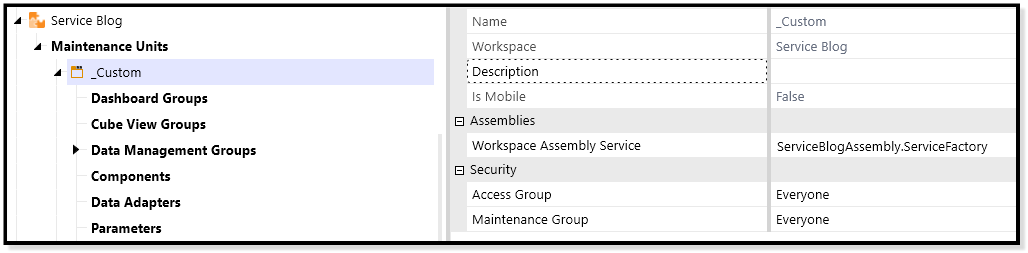
Data management step syntax
To get maintenance unit assembly services to kick off, we use the identifier "WSMU" (See below)
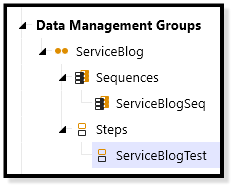
WSMU identifier
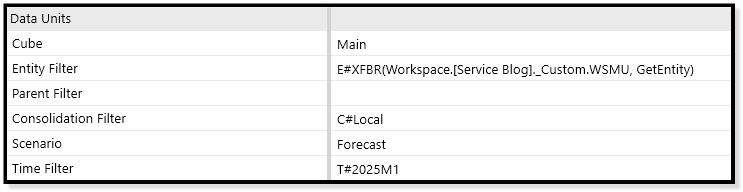
The Data Management Jobs
Data Management Step Data Unit Configuration
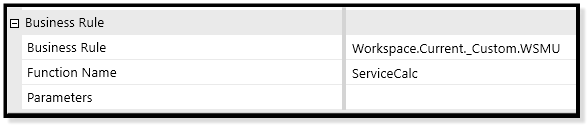
Data Management Step Business Rule Configuration

Inside the Service Factory

C#Service Factory
1
2using System;
3using System.Collections.Generic;
4using System.Data;
5using System.Data.Common;
6using System.Globalization;
7using System.IO;
8using System.Linq;
9using Microsoft.CSharp;
10using OneStream.Finance.Database;
11using OneStream.Finance.Engine;
12using OneStream.Shared.Common;
13using OneStream.Shared.Database;
14using OneStream.Shared.Engine;
15using OneStream.Shared.Wcf;
16using OneStream.Stage.Database;
17using OneStream.Stage.Engine;
18using OneStreamWorkspacesApi;
19using OneStreamWorkspacesApi.V800;
20
21namespace Workspace.__WsNamespacePrefix.__WsAssemblyName
22{
23  public class ServiceFactory : IWsAssemblyServiceFactory
24  {
25      public IWsAssemblyServiceBase CreateWsAssemblyServiceInstance(SessionInfo si, BRGlobals brGlobals,
26          DashboardWorkspace workspace, WsAssemblyServiceType wsAssemblyServiceType, string itemName)
27      {
28          try
29          {
30              switch (wsAssemblyServiceType)
31              {
32                  case WsAssemblyServiceType.FinanceCustomCalculate:
33                      return new ServiceBlogCalc();
34
35                  case WsAssemblyServiceType.XFBRString:
36                      return new XFBRHelper();
37
38                  default:
39                      return null;
40              }
41          }
42          catch (Exception ex)
43          {
44              throw new XFException(si, ex);
45          }
46      }
47  }
48}
49
This is where the magic happens. When I execute my DM step, OneStream's backend goes to my service factory's switch statement and feeds it my function name (which will come in as ServiceCalc), which is passed through the itemName parameter.
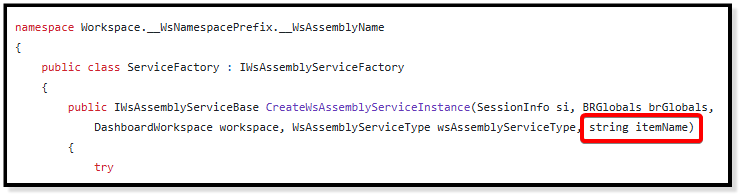
Service factory code
The itemName instantiated through the Assembly Service instance
Upon execution, OneStream's backend also feeds the service factory the type of service (in this case, a finance custom calc service) that was kicked off, again along with the function name via the itemName parameter.
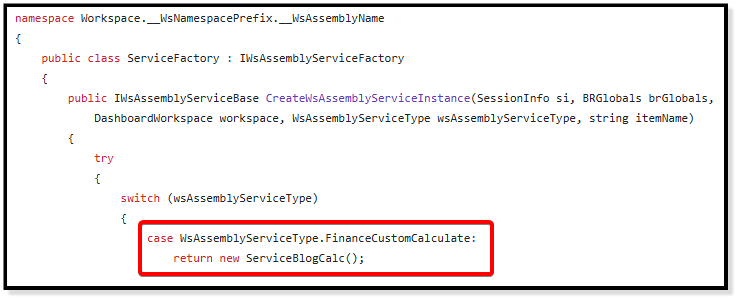
itemName parameter
Since the code under this case signifies "create a new ServiceBlogCalc class" (which is coded out in a finance custom calc service file named ServiceBlogCalc.cs), it proceeds in kicking off any code in that class.
C#Service Blog Calc
1
2using System;
3using System.Collections.Generic;
4using System.Data;
5using System.Data.Common;
6using System.Globalization;
7using System.IO;
8using System.Linq;
9using Microsoft.CSharp;
10using OneStream.Finance.Database;
11using OneStream.Finance.Engine;
12using OneStream.Shared.Common;
13using OneStream.Shared.Database;
14using OneStream.Shared.Engine;
15using OneStream.Shared.Wcf;
16using OneStream.Stage.Database;
17using OneStream.Stage.Engine;
18using OneStreamWorkspacesApi;
19using OneStreamWorkspacesApi.V800;
20using OpenXmlPowerTools;
21
22namespace Workspace.__WsNamespacePrefix.__WsAssemblyName
23{
24
25  public class ServiceBlogCalc : IWsasFinanceCustomCalculateV800
26  {
27      private System.Text.StringBuilder debugString;
28
29      public void CustomCalculate(SessionInfo si, BRGlobals brGlobals, FinanceRulesApi api, FinanceRulesArgs args)
30      {
31
32          debugString = new System.Text.StringBuilder();
33
34          try
35          {
36              switch (args.CustomCalculateArgs.FunctionName)
37              {
38                  case "ServiceCalc": ServiceCalc(si, api); break;
39                  default: break;
40              }
41              return;
42          }
43          catch (Exception ex)
44          {
45              throw new XFException(debugString.ToString(), ex);
46          }
47      }
48
49      public void ServiceCalc(SessionInfo si, FinanceRulesApi api)
50      {
51          // Clear the calculated data
52          debugString.AppendLine("Clearing calculated data");
53          api.Data.ClearCalculatedData("A#TestAccount", true, true, true, true);
54
55          // Set test account to 100
56          // Don't use A#All unless you know what you're doing folks
57          debugString.AppendLine("Setting test account to 100");
58          string targetPov = "V#Periodic:A#All:F#EndBal_Input:O#None:I#None:U1#None:U2#None:U3#None:U4#None:U5#None:U6#None:U7#None:U8#None";
59          api.Data.Calculate($"{targetPov} = 100", accountFilter: "A#TestAccount");
60      }
61  }
62}
63

Inside the Finance Calc File

Now we're in the ServiceBlogCalc.cs file. We have our functionality split out into clean, readable methods.
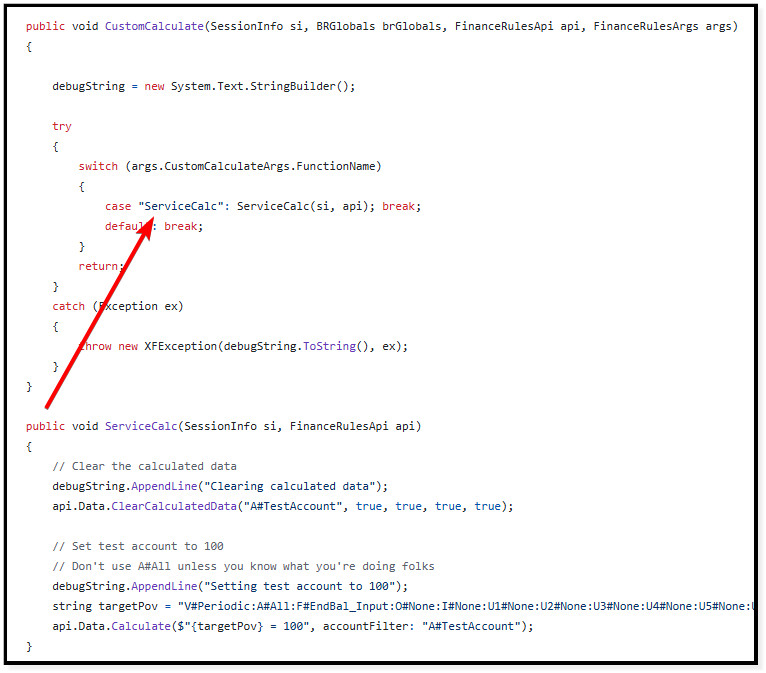
ServiceBlogCalc.cs file
Split out function
For the kick off of the XFBR, we call the helper class to retrieve those workflow variables for us and manipulate the workflow name to get us the raw entity that is attached to the data unit configuration for the data management step above.

XFBR helper class
Functionalizing Workflow Variable Retrieval
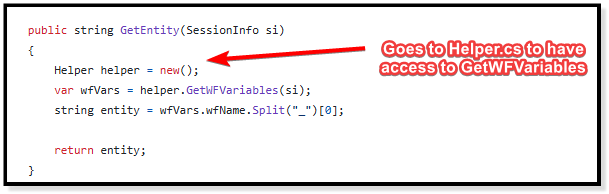
Entity extraction
Gets the entity for dynamic call on the Data Management Step
And from there, the finance calc kicks off based on the DM step's data unit configuration, just as any "normal" finance business rule would and puts the 100 where I want it.

Finance calc result

"Seems like a lot of steps, sir"

I know what you're thinking. And yes, it is a few steps (and probably a lot of mental gymnastics to follow). But if we do it this way, we can have as many finance calc files as we want. We just use the itemName to pick which classes to kick off (which can all be 1-1 with the files).
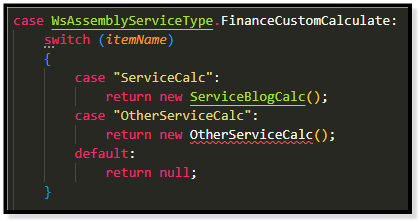
Multiple classes
There's a squiggle because I just made up another class and it's mad that it doesn't exist
That's probably not intuitive either, so let me explain with a common scenario that I am sure has happened to most of you:
  • Project Manager: "Hey everyone, we have three different model calculations to code out. We'll split the work amongst ourselves throughout the project, along with all the reporting artifacts that we need to build."
  • Assignments: "Model 1 is assigned to Person A, Model 2 is assigned to Person B, Model 3 is assigned to Person C."
  • (Everyone goes off to complete their tasks)
  • (Person A finishes building their portion of reporting artifacts and begins work on Model 1 in the singular "FinanceCalcs" business rule for all the models. They save their work midway to test.)
  • Person B: "Oh no! All the work that I have been coding out is GONE after clicking back into the file!"
I'm sure most of you know what happened here. And at least one person is grinning and telling me that I should just "get the lost code in the audit tables."
But why? Why should I have to do that? Why should we risk overwriting each other in a massive, monolithic business rule?
When we can have separate models in separate files and separate classes in Assemblies, allowing us to delegate people to files so we don't run over each other.
And while we're at it, why not have everything related to the functionality we're developing in one assembly, in one workspace, with those same separate files, with all the functionality extremely portable from the get-go for easy migration?

It's worth it

The assembly concept drives us closer to tried-and-true computer science concepts (that I promised I wouldn't bore you with), but the consequence of this is massively increased scalability, increased maintainability, and far better collaboration.
When OneStream comes out with version control on assemblies, this entire setup will be even better.
I highly recommend coding things out this way for everything (not just finance custom calcs). It has made everything coding-related that I do in OneStream so much easier.
Happy coding, friends.