← Back to Blog
What I'm Building Now: Calculation Register
Eric Padua·
A New Blog Series!
Welcome to the first post in a new series I'm calling "What I'm Building Now." I've spent a lot of time designing and implementing solutions in OneStream, but I rarely get the chance to step back and document the different design patterns I come up with. So, why not do it here for everyone's benefit?
This series will be a high-level look into the architecture of various OneStream solutions I'm working on. My goal is to share insights, spark conversation, and maybe even give you a few ideas for your own projects. I'll be enabling comments on these posts, so if you have questions or want to chime in with your own experiences, please do! I'll do my best to answer.
The Calculation Register Design Pattern
Let's kick things off with a pattern I use in almost every implementation: the Calculation Register.
This design pattern is my go-to solution for a common business scenario. Imagine a client needs to upload data into OneStream that contains dimensions not native to the application. The business process usually sounds something like this: "We have some data that our team creates on the fly in Excel, and we need to get it into OneStream, run some calculations, and push it to the cube."
Sound familiar? This is where the Calculation Register comes in.
At a high level, the user experience is straightforward:
-
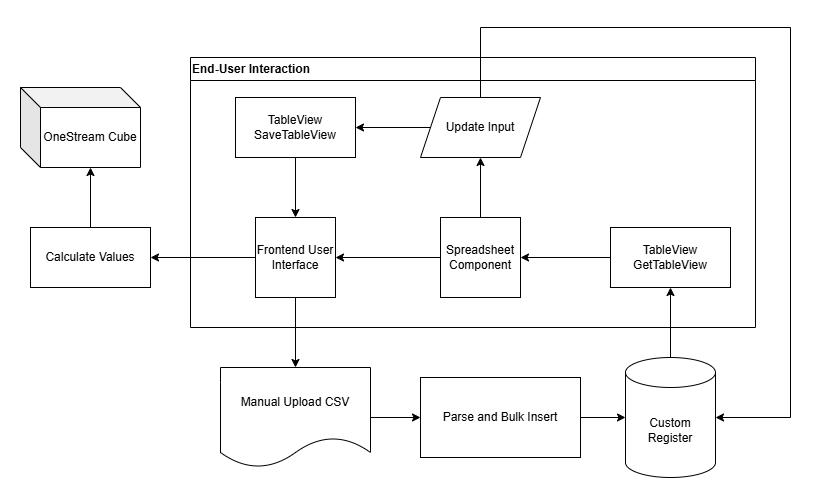
The user uploads a CSV file through a simple front-end interface.
-
The data from the file appears in a clean TableView within a spreadsheet component.
-
From here, they can review the data and even make manual adjustments directly in the table.
-
Once they're happy with it, they click a "Calculate" button, which processes the data and pushes the final values to the OneStream cube.
What's Happening in the Background?
While the user experience is smooth, there are a few moving parts behind the scenes to make it all work.
-
File Upload: The user clicks a button configured for file uploads. This action saves the file directly to OneStream's Application Database.
-
Data Retrieval: The upload button has a parameter that passes the file's path to a business rule. This rule then retrieves the file using
BRApi.FileSystem.GetFile(). -
Parsing and Storing: The key here is to set the
includeContentFileBytesoption totruewhen you callGetFile. This gives you the file's raw content as a byte array. I then feed these bytes into a function that parses the CSV and performs a bulk insert into a dedicated relational table—our register. -
Calculation: The "Calculate" button triggers a data management sequence with a finance rule attached. I typically approach the calculation in one of two ways:
-
Pure SQL: This method is incredibly fast. A SQL statement runs directly against the register table, performs the necessary calculations, and stores the results in "globals." However, this can be a bit arcane for clients who might need to understand or maintain the logic later.
-
Finance Rule: This approach involves capturing the data from the register table and loading it into "globals." The finance rule then loops through each data unit, performing calculations based on the data stored in "globals." Performance is probably about the same for a small amount of data (which is what you should be doing for this process anyway), but as a finance rule, it may be a bit easier to digest since you won't need to be a SQL expert to understand it.
-
A Quick Sidenote on Terminology: I've heard these tables called "registers" for years, and I get why. But I can't help but feel it adds a layer of confusion. We're working with relational tables. Even if someone on the business side doesn't know what that means, calling it what it is gets everyone, including IT, on the same page. Clear language benefits everyone.
Why I Like This Approach
So, why go through the trouble of setting all this up?
First, the table view in a spreadsheet component looks clean and provides the best way to get grid-style input from a user. Unfortunately, there's a lot that goes into setting it up correctly, and it involves many working components. It would be amazing to have a simple dashboard component that lets you create an input grid for business rules (maybe accessible through a
GridInput object—a guy can dream, right?).Regardless, for now, it's our best option. The user experience is far superior to using a SQL Table Editor component, which, while functional, doesn't look nearly as polished (in my opinion) — another thought would maybe be to make the SQL Table Editor look more "modern".
Finally, this pattern is completely repeatable. After building this out a few times, I've created a template for myself that I can quickly adapt for future projects, saving a ton of development time.
Until Next Time
I'll try to post one of these whenever a new and interesting project comes along, though I can't promise a specific cadence.
Hopefully, you found this first post engaging and useful. Let me know your thoughts in the comments!